
Description
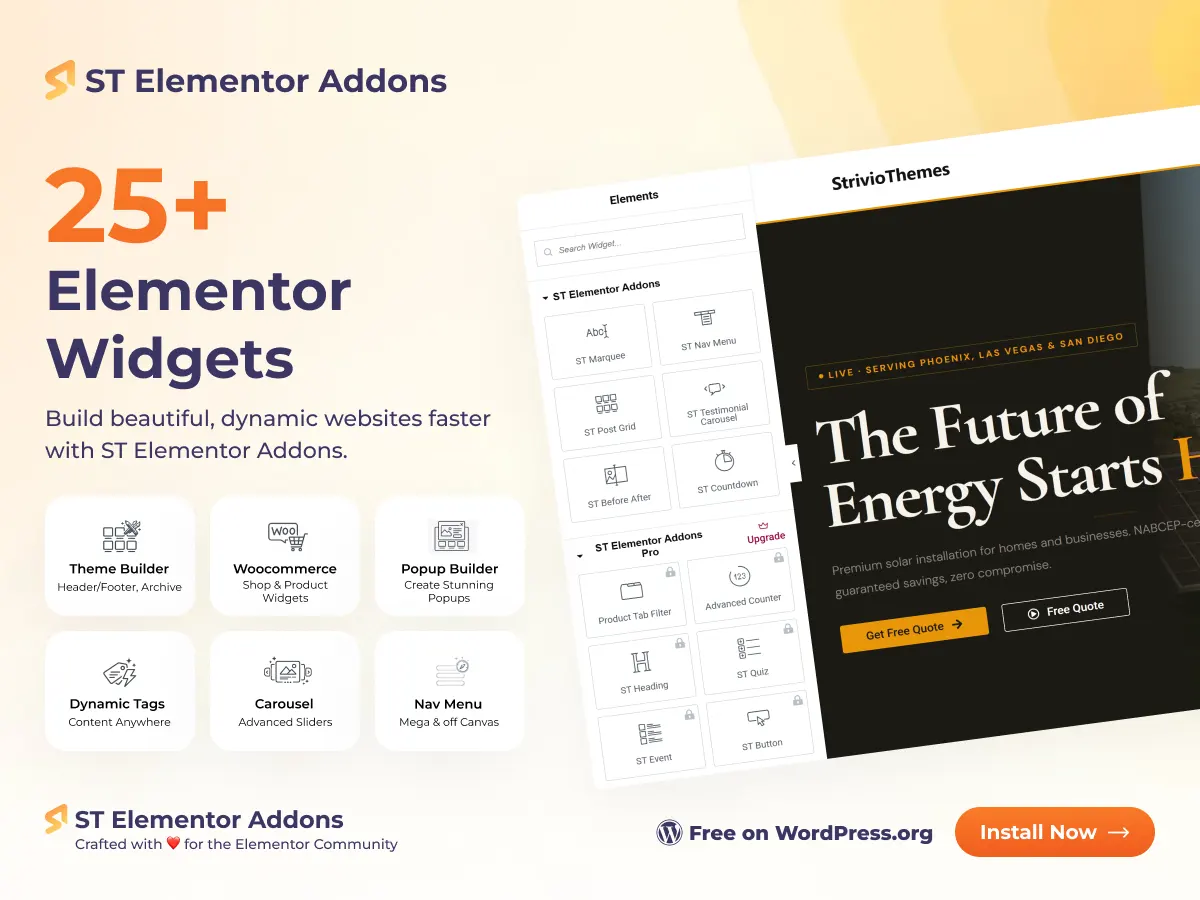
ST Elementor Addons is a freemium WordPress plugin that dramatically expands what you can build with Elementor. Where Elementor ends, ST Elementor Addons begins – adding 25+ conversion-focused widgets, a complete Theme Builder for custom headers and footers, a full WooCommerce widget suite, a Pop-up Builder, Dynamic Tags, and productivity extensions, all in a single lightweight package.
Unlike bloated addon plugins that slow your site with scripts loaded on every page, ST Elementor Addons uses a smart register-only asset system: CSS and JavaScript are loaded only on pages where a widget actually appears. Every widget can be individually enabled or disabled from the admin dashboard, so you carry zero overhead from features you do not use.
Whether you are building a personal blog, a WooCommerce store, a marketing landing page, or a full agency website, ST Elementor Addons gives you the tools to do it entirely inside Elementor – without purchasing Elementor Pro or installing half a dozen separate plugins.
Why ST Elementor Addons Stand Out
Most Elementor addon plugins fall into one of two traps: they are either too limited (offering a handful of basic widgets) or too heavy (loading global scripts that hurt Core Web Vitals scores on every page). ST Elementor Addons takes a different approach.
- Built for Elementor’s Container system: every widget is designed for Elementor’s modern flexbox-based container layout, not the legacy section/column system. Your layouts stay future-proof.
- Per-widget toggle controls: the admin dashboard lets you switch individual widgets on or off. Disabled widgets are not loaded in PHP at all – zero memory overhead, zero asset cost.
- Register-only asset loading: all CSS and JS are registered at plugin init, but only enqueued by the widget that needs them, only on pages where that widget renders. No global stylesheet bloat.
- FontAwesome smart loading: the plugin detects whether Elementor’s own FontAwesome is available and uses it first, only falling back to its bundled copy if needed – preventing duplicate icon library loads.
- No page builder lock-in for Theme Builder: the Theme Builder outputs standard WordPress header/footer hooks with proper schema.org markup, making it compatible with virtually any WordPress theme.
- WPML and Polylang ready: the Theme Builder passes all template IDs through the WPML translation filter, so multilingual sites automatically display the correct translated header, footer, or template.
General Widgets – Build Any Page
- ST Button: craft primary, secondary, and outline CTAs with full control over shape, gradient fills, icon placement, and hover state animations. Every button style your designs demand.
- ST Heading: advanced heading widget with gradient text support, giving you typographic options beyond Elementor’s native heading widget.
- ST Marquee: create looping announcement bars, offer tickers, and icon strips powered by GSAP and the Observer API. Control speed, direction, gap, and responsive spacing without JavaScript.
- ST Flexbox Carousel: drop any Elementor container or widget into a fully responsive autoplay slider. Per-breakpoint column counts, autoplay speed, gap controls, and navigation styling – all in the Elementor panel.
- ST Nav Menu: design sticky navigation, mega menus, and single-page scroll navigation entirely in Elementor. Fully compatible with the ST Theme Builder sticky header system.
- ST Post Grid: display blog posts or any custom post type in a customizable grid with query builder, AJAX pagination, category badges, and meta field toggles.
- ST Testimonial Carousel: showcase customer reviews with avatar, star rating, and multi-column layouts. Smooth sliding with per-breakpoint item counts.
- ST Before & After Slider: compare two images with a draggable divider handle. Built on jquery-event-move for smooth touch and mouse interaction.
- ST Countdown: urgency-driving countdown timer. Free version included from v0.2.4 with full customization controls.
- ST Quiz Widget: interactive quiz widget for lead generation, product recommendation funnels, and audience engagement.
- ST Event Widget: event listing and display widget for showcasing upcoming events with rich detail controls.
Popup Builder – Convert More Visitors
The ST Popup Builder gives you a full popup design system inside Elementor. Create targeted popups using any Elementor template, with complete control over overlay styles, close button positioning, and trigger behavior. The included Popup Trigger Dynamic Tag lets you attach popup open/close events to any Elementor widget – buttons, images, text, icons – without writing any JavaScript.
Popups are stored as a custom post type, making them easy to manage, duplicate, and organize alongside your other Elementor templates.
WooCommerce Widget Suite – Build Your Entire Store in Elementor
ST Elementor Addons includes a comprehensive set of WooCommerce widgets that let you design every part of your online store – product archive pages, individual product pages, cart, and checkout – using Elementor’s drag-and-drop editor. All WooCommerce widgets load only when WooCommerce is active.
- ST Product Grid: merchandise collections with sale badges, quick-view, ratings, wishlist, and a powerful query builder. Supports AJAX-powered numbered pagination and add-to-cart actions with SweetAlert2 notifications.
- ST Product Select Filter: dropdown filters for categories, tags, attributes, or any custom taxonomy – instantly narrows product grid results.
- ST Product Checkbox Filter: multi-select checkboxes with live product counts and AJAX-ready markup for real-time filtering without page reload.
- ST Product Tab Filter: Organize featured, popular, sale, and custom product groups into responsive, clickable tabs above the product grid.
- ST Product Add to Cart: place buy buttons anywhere on the page with quantity selector, alignment controls, and product variation support.
- ST Product Price: style regular price, sale price, and currency symbol independently with full Elementor typography and color controls.
- ST Product Data Tabs: redesign WooCommerce’s description, additional information, and reviews tabs to match your brand perfectly.
- ST Product Rating: display average star ratings with custom icon choices, alignment, and independent typography styling.
- ST Woo Breadcrumbs: improve UX and structured data with breadcrumb navigation built specifically for Elementor container layouts.
- ST Cart Page: build a fully custom cart page experience with order summary, coupon field, and CTA button styling.
- ST Checkout Page: redesign the checkout form fields, layout, and call-to-action areas to reduce abandonment and match your brand.
Built-in Wishlist System
ST Elementor Addons includes a complete product wishlist feature at no extra cost. Logged-in users can add and remove products from a persistent wishlist stored as user meta. The wishlist integrates with the ST Product Grid widget via AJAX, with SweetAlert2 popups for login-required prompts and action confirmation. A Please log in to view your wishlist.
Theme Builder – Replace Your Theme’s Header, Footer & Templates
The ST Theme Builder is one of the most powerful features in the plugin. It gives you a full visual template system to replace your theme’s header, footer, singular post layouts, and archive pages with pixel-perfect Elementor designs – without needing Elementor Pro.
- Template Types: create separate Elementor templates for Header, Footer, Singular (individual posts/pages), and Archive (category/tag/search/product archive) layouts.
- Display Rules: assign templates to specific pages, posts, post types, taxonomy terms, or set them as global defaults. Combine include and exclude rules with user role targeting for granular control over who sees what.
- Sticky Header System: the Header Sticky extension adds dedicated controls to every Elementor container: independently set background, shadow, border, padding, and margin for the default and sticky states. Elements can be shown or hidden exclusively in sticky mode – enabling transparent-to-solid header transitions with zero JavaScript configuration.
- Live Preview in Elementor Editor: preview any Theme Builder template as a specific post, page, archive, or taxonomy directly in the Elementor editor. Preview source is set per template and updates instantly.
- WPML & Polylang Compatible: template IDs are resolved through the wpml_object_id filter, ensuring multilingual sites serve the correct translated template automatically.
- Schema.org Markup: rendered headers and footers include proper WPHeader and WPFooter schema.org itemtype attributes for improved structured data.
Productivity Extensions
- ST Dynamic Tags: bind Elementor widget content to post meta, author data, WooCommerce product values, ACF custom fields, and the Popup Trigger tag – enabling truly dynamic, data-driven page designs.
- ST Custom CSS: inject widget-level CSS directly in the Elementor panel without touching theme files. Scoped to the individual widget’s wrapper for precision targeting.
- ST Floating Effect: animate hero sections, icons, cards, and CTAs with continuous floating, bob, or drift animations. Pure CSS output – no JavaScript required.
- ST Social Chat Buttons: add WhatsApp, Messenger, Telegram, or custom chat launcher buttons to any page with one-click theming and position controls.
- Heading Gradient Extension: extends Elementor’s native Heading widget with gradient text controls – no separate widget required.
Who Is ST Elementor Addons For?
- Freelance web designers and developers: who want a single, reliable addon plugin that covers every design need without slowing client sites.
- Digital agencies: building multiple WordPress sites that need a consistent, toggle-controlled widget set that scales across projects.
- WooCommerce store owners who want to design their product pages, filters, cart, and checkout entirely in Elementor without Elementor Pro.
- Bloggers and content creators who want advanced post grid layouts, dynamic tags, and pop-up lead capture without investing in premium plugins.
- Theme developers using Elementor: who want a full Theme Builder system to ship custom header/footer designs as part of their theme package.
- Marketing teams: who need countdown timers, pop-up builders, social chat buttons, and quiz widgets to run conversion campaigns directly in Elementor.
Free Vs Pro
| Feature Type | Widget / Feature | Free | Pro |
| General Widget | ST Button | ✅ | ✅ |
| ST Heading (+ Gradient) | ✅ | ✅ | |
| ST Marquee | ✅ | ✅ | |
| ST Flexbox Carousel | ✅ | ✅ | |
| ST Nav Menu | ✅ | ✅ | |
| ST Post Grid | ✅ | ✅ | |
| ST Testimonial Carousel | ✅ | ✅ | |
| ST Before & After Slider | ✅ | ✅ | |
| ST Countdown | ✅ | ✅ | |
| ST Quiz Widget | ✅ | ✅ | |
| ST Event Widget | ✅ | ✅ | |
| ST Social Chat Buttons | ✅ | ✅ | |
| ST Popup Builder | ✅ | ✅ | |
| WooCommerce Widget | ST Product Grid + Wishlist | ✅ | ✅ |
| ST Product Select Filter | ✅ | ✅ | |
| ST Product Checkbox Filter | ✅ | ✅ | |
| ST Product Tab Filter | ✅ | ✅ | |
| ST Product Add to Cart | ✅ | ✅ | |
| ST Product Price | ✅ | ✅ | |
| ST Product Data Tabs | ✅ | ✅ | |
| ST Product Rating | ✅ | ✅ | |
| ST Woo Breadcrumbs | ✅ | ✅ | |
| ST Cart Page | ✅ | ✅ | |
| ST Checkout Page | ✅ | ✅ | |
| Theme Builder | Post Title | ❌ | ✅ |
| Post Content | ❌ | ✅ | |
| Post Featured Image | ❌ | ✅ | |
| Extensions | ST Dynamic Tags | ✅ | ✅ |
| ST Custom CSS | ✅ | ✅ | |
| ST Floating Effect | ✅ | ✅ | |
| ST Heading Gradient | ✅ | ✅ | |
| Header Sticky Controls | ✅ | ✅ |
Frequently Asked Questions
Q: Do ST Elementor Addons require Elementor Pro?
No. ST Elementor Addons works with the free version of Elementor (3.10.0 or higher). You do not need Elementor Pro for the vast majority of features, including the full Theme Builder, all WooCommerce widgets, the Popup Builder, Dynamic Tags, and all 25+ general widgets. Three Theme Builder content widgets (Post Title, Post Content, Post Featured Image) require a Pro license from StrivioThemes.
Q: Will ST Elementor Addons slow down my website?
No. ST Elementor Addons uses a register-only asset loading approach. All CSS and JavaScript files are registered at plugin initialization, but only enqueued on pages where that specific widget actually renders. Additionally, each widget can be individually disabled from the admin dashboard, which prevents its PHP file from loading at all. This makes ST Elementor Addons one of the most performance-conscious Elementor addon plugins available.
Q: What is the ST Theme Builder, and do I need Elementor Pro for it?
The ST Theme Builder lets you design custom headers, footers, singular post layouts, and archive templates entirely in Elementor — without Elementor Pro. You can assign templates to specific pages, post types, taxonomy archives, or set them as global defaults. Include and exclude rules, user role targeting, and a live preview system in the Elementor editor are all included free.
Q: Can I use ST Elementor Addons to build WooCommerce product pages in Elementor?
Yes. ST Elementor Addons includes 11 WooCommerce-specific widgets covering product grids, filtering (dropdown, checkbox, tab), add-to-cart, product price, data tabs, ratings, breadcrumbs, cart page, and checkout page. Combined with the Theme Builder, you can design your entire WooCommerce store — from shop archive to checkout — using only Elementor and this plugin.
Q: How does the sticky header system work?
The Header Sticky extension adds controls to every Elementor section and container. You can independently configure background color, box shadow, border, padding, and margin for both the default state and the sticky state. Individual elements can be shown or hidden in each state, enabling common effects like transparent-to-solid header transitions or showing a compact logo only when scrolled. The sticky state is triggered by a CSS class added by the plugin’s lightweight JavaScript.
Q: Are ST Elementor Addons compatible with WPML and Polylang?
Yes. The Theme Builder includes a dedicated WPML compatibility class that passes all template IDs through the wpml_object_id filter. For Polylang, it handles null returns (when a translation does not exist) gracefully by falling back to the original template. This ensures multilingual sites automatically display the correct translated header, footer, or page template.
Q: Can I control which widgets are active?
Yes. The admin dashboard includes a widget management panel where each widget can be individually toggled on or off. When a widget is disabled, its PHP file is not loaded, its assets are not registered, and it does not appear in the Elementor widget panel. This gives you complete control over your plugin’s footprint.
Q: What is the Flexbox Carousel, and how is it different from other carousels?
The ST Flexbox Carousel is container-based — meaning you can place any Elementor container, widget, or complex layout inside each carousel slide. Most carousel widgets only accept simple text or image content. The Flexbox Carousel accepts the full power of Elementor’s drag-and-drop editor inside each slide, with per-breakpoint column counts, autoplay, gap controls, and navigation styling.
Q: Does the plugin include a pop-up builder?
Yes. The ST Popup Builder lets you design popups using any Elementor template, with full control over overlay appearance, close button styling, and trigger behavior. The Popup Trigger Dynamic Tag lets you attach pop-up open/close actions to any Elementor widget without writing code. Popups are stored as a custom post type for easy management.
Q: Where can I get support and documentation?
Documentation, tutorials, and support are available at striviothemes.com. The plugin’s readme includes installation instructions and FAQ entries. Video tutorials are linked from the plugin’s admin dashboard. For theme-related questions, the StrivioThemes support team can be reached through the website.








Nikolai Petrov –
The widgets are powerful and helped me design professional pages quickly.
Claire Dubois –
Love the popup builder and carousel features, very flexible.
Elena Popescu –
WooCommerce widgets are super useful for my online store.
André Silva –
Smooth performance and easy drag-and-drop customization options.
Jonas Müller –
Lightweight yet feature-rich, great addition to Elementor workflow.