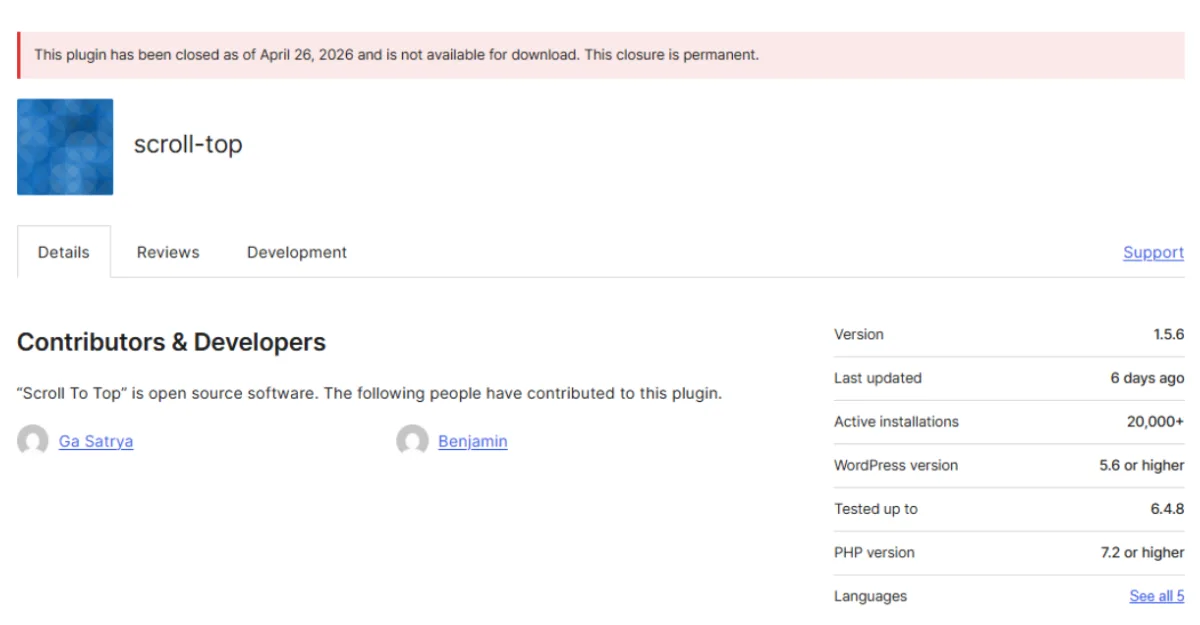
If you installed the Scroll To Top plugin on a WordPress site any time in the last two years, your site is almost certainly compromised. On April 26, 2026, the WordPress.org Plugin Review Team permanently closed the plugin after security researcher Austin Ginder of Anchor Hosting disclosed a hidden update channel that had been silently pushing tampered code to roughly 20,000 active installs since February 2024.
The good news: cleanup takes one command if you have WP-CLI access. The bad news: the WordPress.org forced update will not reach you, because the backdoor told your site to stop checking WordPress.org for updates years ago.
This guide walks you through exactly how the Scroll To Top plugin removed incident happened, how to confirm whether your site is one of the affected 20,000, and how to remove the malware safely.
Key Takeaways
- Scroll To Top (slug
scroll-top, 20,000 installs) was closed by WordPress.org on April 26, 2026 after a researcher found it had been polling a Panama-registered third-party server for updates since November 2023. - Sites running tampered version 1.5.5 will not auto-update to the clean 1.5.6 release because they bypass the WordPress.org update channel entirely.
- The backdoor rewrites your page content (including Elementor pages) on a daily cron and gives the attacker a one-zip-swap path to remote code execution.
What Happened With Scroll To Top
Scroll To Top is a small utility plugin originally written by Indonesian developer Ga Satrya in 2014 to add a back-to-top button to WordPress sites. Sometime in 2023, Satrya sold the plugin to a buyer who used the WordPress.org account @milkitall (real name Benjamin, GitHub handle tombenj).
According to Austin Ginder’s disclosure published April 30, 2026, the new owner registered the domain cdnstaticsync.com on November 12, 2023. Nine days later, on November 21, 2023, he committed version 1.5.3 to the WordPress.org SVN repository. That version added a small but devastating piece of code: a plugin update checker pointing at his own private server instead of WordPress.org.
This meant every site that updated to 1.5.3 stopped asking WordPress.org for new versions. Instead, they asked updates.cdnstaticsync.com. And starting in February 2024, that endpoint began serving a tampered version 1.5.5 that contained the actual backdoor.
The version 1.5.5 zip never appeared on WordPress.org. WordPress.org only ever saw 1.5.3.
Timeline of the Disclosure
The dates matter for two reasons. First, they show how long the malware was live before anyone caught it. Second, they tell you whether your site has been infected for two months or two years.
| Date | Event |
|---|---|
| 2014-02-22 | Ga Satrya publishes original Scroll To Top plugin |
| 2023-10-29 | Buyer registers WordPress.org account @milkitall |
| 2023-11-12 | Domain cdnstaticsync.com registered via Panamanian privacy registrar |
| 2023-11-21 | Backdoor commit (version 1.5.3) pushed to WordPress.org SVN |
| 2024-02-25 | Tampered version 1.5.5 goes live on private update server |
| 2026-04-24 | Austin Ginder’s WP Beacon scanner flags the plugin |
| 2026-04-25 | Disclosure sent to WordPress.org Plugin Review Team |
| 2026-04-26 | WordPress.org closes Scroll To Top, ships clean 1.5.6 |
| 2026-04-30 | Public technical writeup published on Anchor Hosting |
In short, the Scroll To Top plugin was removed from WordPress.org within 24 hours of the report, but the backdoor had been actively pushing payloads for 2 years and 5 months before anyone noticed.
How to Check If Your Site Is Affected
There are two reliable ways to confirm whether your site is running the tampered version. Both take less than a minute.
Method 1: Check the plugin version
Log into your WordPress dashboard, go to Plugins → Installed Plugins, and look at the Scroll To Top entry.
- If it shows version 1.5.5, your site was infected. WordPress.org has never released 1.5.5.
- If it shows version 1.5.3, your site has the side-channel hook but the backdoor module may not yet be installed. Treat it as infected.
- If it shows version 1.5.6, your site updated through WordPress.org before the backdoor took effect. You are clean.
Method 2: Run WP-CLI checksums
If you have shell access, this is the fastest single test:
wp plugin verify-checksums scroll-top
WordPress.org has no checksums for version 1.5.5, so on a tampered install this command returns:
Could not retrieve the checksums for scroll-top 1.5.5
That message alone confirms the side-channel install. As Ginder noted in his disclosure, this single command would have caught both this attack and the earlier anadnet backdoor if site owners had run it as a routine fleet check.
Method 3: Grep the file system
For agencies managing fleets of sites, this one-liner catches every infected install in a directory tree:
find . -path '*/scroll-top/inc/class-scroll-top-content-updater.php' \
  -exec grep -l 'cdnstaticsync' {} \;
A clean install returns nothing. A backdoored install prints the file path.
Full Cleanup Guide for Infected Sites
If any of the checks above returned a positive result, follow these steps in order. Do not just deactivate the plugin and walk away. The malware writes data to your database, and deactivation alone leaves recently rewritten posts in their tampered state.
Step 1: Take a backup before anything else
Before you touch anything, generate a fresh backup of your files and your database. If something goes wrong during cleanup, you need a rollback path. Use UpdraftPlus, your host’s backup tool, or wp db export if you have shell access.
Step 2: Replace the plugin with the clean version
This is the one-command fix. From the WordPress root directory, run:
wp plugin install https://downloads.wordpress.org/plugin/scroll-top.1.5.6.zip --activate --force
The --force flag tells WP-CLI to overwrite the existing plugin folder. The 1.5.6 zip from WordPress.org has no update-checker hook, no content-updater class, and no cron job. Once it replaces the tampered files on disk, the daily phone-home stops immediately.
If you do not have WP-CLI access, you can do this manually:
- Download
scroll-top.1.5.6.zipfromdownloads.wordpress.org/plugin/scroll-top.1.5.6.zip - Delete the existing
/wp-content/plugins/scroll-top/directory entirely (do not just overwrite it, because the malicious files live ininc/and you need them gone) - Upload and extract the new zip into
/wp-content/plugins/ - Activate from the WordPress dashboard
Step 3: Audit your post content
The backdoor’s daily cron rewrites the post_content field of WordPress posts and Elementor documents. Replacing the plugin stops new rewrites, but it does not undo existing ones.
Check recently modified pages and posts. Look for:
- Hidden links to spam domains in the body content
- Unfamiliar text injected near the top or bottom of posts
- Elementor pages where the layout looks subtly different than you remember
- New posts you did not author
Restore from a clean backup any pages that have been tampered with. If you do not have a clean backup from before February 2024, manually clean the affected post_content fields.
Step 4: Look for new admin users
The Elementor injection path in this backdoor uses wp_set_current_user to impersonate the first administrator on the site. While that is not the same as creating a new admin, it is good hygiene to audit your Users → All Users list anyway and remove any account you do not recognize. Several other 2026 supply-chain incidents created rogue admin accounts as part of their payload.
Step 5: Reset all admin passwords
Force a password reset on every administrator account. The backdoor had filesystem-level access for years, which means session tokens and stored credentials should be considered compromised even if no obvious abuse occurred.
If you manage WordPress sites for clients, running
wp plugin verify-checksumsacross your fleet right now is the fastest way to find every site affected by this and similar attacks. We can help with a security audit if you do not have the tooling in place.
What the Backdoor Actually Does
For the technically curious or for incident-response writeups, here is what the malicious code in inc/class-scroll-top-content-updater.php does on every infected site:
It registers a daily WP-Cron event, a wp_loaded handler, and a public ?gimme=updates query trigger. Any one of these can fire the payload.
When triggered, it sends your site’s hostname to https://edge.cdnstaticsync.com/bro/3/<your-hostname> and gets back a JSON list of pages to rewrite. For standard WordPress posts, it calls wp_update_post to replace the content. For Elementor pages, it loads the Elementor document model, fetches the first admin user via the REST API, calls wp_set_current_user to impersonate them, and saves the rewritten document tree. This bypasses Elementor’s permission checks because the operation appears to come from a logged-in admin.
The class also disables SSL verification on the C2 connection, which means the attacker can swap the response with no detection from the plugin.
There is a second, dormant capability that has not been used yet. The same hook that delivers content updates can deliver a replacement plugin zip. One zip swap on the attacker’s side, and within 12 hours every infected site auto-installs whatever PHP file the attacker chose. That includes a webshell. Ginder describes this as “wired but not pulled”, meaning it is not currently active but could be activated at any time until the cleanup is run.
That is why deactivating the plugin without removing it is not enough. The dormant code path stays viable.
What to Install Instead of Scroll To Top
Here is a question worth asking: do you actually need a plugin to add a back-to-top button to your site?
The functionality is roughly 15 lines of code. Modern browsers handle smooth scrolling natively with one CSS line. A small JavaScript snippet handles the show-on-scroll behavior. You do not need a plugin to do this, and you definitely do not need one whose ownership history you cannot verify.
Add this to your theme’s CSS:
html { scroll-behavior: smooth; }
.back-to-top { position: fixed; bottom: 20px; right: 20px; }
And a few lines of JavaScript to show/hide on scroll. Most modern WordPress themes (Astra, Kadence, GeneratePress, the default Twenty Twenty-Five) ship with a built-in back-to-top toggle in their customizer settings. Check your theme options before installing anything.
If you really want a plugin, look for one with a long history of single-author maintenance, recent commits from a verifiable developer, and no recent ownership changes. The pattern that catches these attacks is ownership transfer followed by a quiet update, so any plugin that has not changed hands recently is statistically safer.
Common Mistakes to Avoid
These are the four cleanup mistakes we see most often when sites have been hit by plugin supply-chain attacks.
Mistake 1: Deactivating instead of replacing. Deactivating the plugin stops the cron from running, but it leaves the malicious class files on disk. If anyone reactivates the plugin (or if the dormant zip-swap path is ever triggered), the backdoor resumes immediately. Always reinstall the clean version on top.
Mistake 2: Trusting the WordPress.org auto-update. Sites running the side-channel 1.5.5 are not subscribed to WordPress.org updates for this plugin. The forced 1.5.6 update will never reach them automatically. You must run the cleanup command manually on every affected site.
Mistake 3: Skipping the post content audit. The plugin’s whole purpose for the attacker was content rewriting. Replacing the plugin stops future rewrites but does not undo past ones. Pages tampered with between February 2024 and April 2026 stay tampered until you check.
Mistake 4: Assuming Wordfence or other scanners caught it. They did not. The backdoor sat live on WordPress.org for two years and five months without being detected by Patchstack, WPScan, or other monitoring tools. Generic malware scanners look for known signatures, not for plugins quietly checking for updates from third-party domains.
If your site has been showing weird SEO drops, sudden traffic anomalies, or unexplained page edits since early 2024, the Scroll To Top plugin removed incident may be the cause. A proper security audit will tell you for certain.
Frequently Asked Questions
1. When was the Scroll To Top plugin removed from WordPress.org?
WordPress.org closed it on April 26, 2026, one day after Austin Ginder’s disclosure. A clean version 1.5.6 was published the same day.
2. How many sites are affected by the Scroll To Top backdoor?
Roughly 20,000 active installs at the time of disclosure, according to WordPress.org’s install counter.
3. Is uninstalling the plugin enough to clean my site?
Not quite. You should also audit recently edited posts and Elementor pages, since the backdoor rewrites content on a daily schedule.
4. Will WordPress.org auto-update fix my site?
No. Affected installs poll a third-party server for updates and never check WordPress.org. You must run the cleanup manually.
5. What is the clean version of Scroll To Top?
Version 1.5.6, released by the WordPress.org Plugin Review Team on April 26, 2026.
6. How do I know if my site is running the tampered version?
Run wp plugin verify-checksums scroll-top. If it errors on version 1.5.5, your site is infected.
7. Who reported the Scroll To Top plugin backdoor?
Austin Ginder of Anchor Hosting, using a detection tool he built called WP Beacon.
8. Are other plugins by the same owner safe?
Three other plugins (Advanced Random Posts Widget, Smart Recent Posts Widget, Comments Widget Plus) have the same SVN owner but currently ship clean code. Audit them too if installed.
9. What does the Scroll To Top backdoor do to my site?
It runs a daily cron that rewrites post content and Elementor pages with attacker-supplied data, often hidden SEO spam.
10. Can I just disable the plugin until I have time to clean it?
Disabling stops the cron, but the malicious files stay on disk. Reinstall the clean 1.5.6 version as soon as you can.
Conclusion:
The Scroll To Top plugin removed story is the third WordPress supply-chain attack disclosed in three weeks, and it will not be the last. The pattern is now clear: a buyer acquires a small but well-installed plugin, registers a private domain, and ships a side-channel update that bypasses WordPress.org review forever.
What changed this week is that we now have detection tools (WP Beacon and wp plugin verify-checksums) that can flag this pattern across a fleet in seconds. If you manage even one WordPress site, run the verify-checksums command tonight on every plugin you have installed. It is free, takes under a minute, and would have caught this incident two years ago.
If your site shows any sign of infection from the Scroll To Top plugin removed event, run the cleanup command above and audit your post content. If you are not comfortable doing that yourself, get help from someone who is, before the dormant zip-swap path on those 20,000 sites gets pulled.
Sources
- Austin Ginder, A Sold WordPress Plugin, a Hidden Update Channel, and 20,000 Backdoored Sites, Anchor Hosting, April 30, 2026 — anchor.host
- Austin Ginder Reports Fourth Plugin Backdoor in a Month, Unveils WP Beacon, The Repository, May 1, 2026 — therepository.email
- WordPress.org Plugin Directory — wordpress.org/plugins/scroll-top
- WP Beacon detection tool — wpbeacon.io
Keep Reading
More WordPress how-tos: